Class Shortcut
Displays a command, help text, and a key binding. Serves as the foundational building block for Bar, Menu, MenuBar, and StatusBar.
public class Shortcut : View, IDisposable, ISupportInitializeNotification, ISupportInitialize, IOrientation, IDesignable- Inheritance
-
Shortcut
- Implements
- Derived
- Inherited Members
- Extension Methods
Remarks
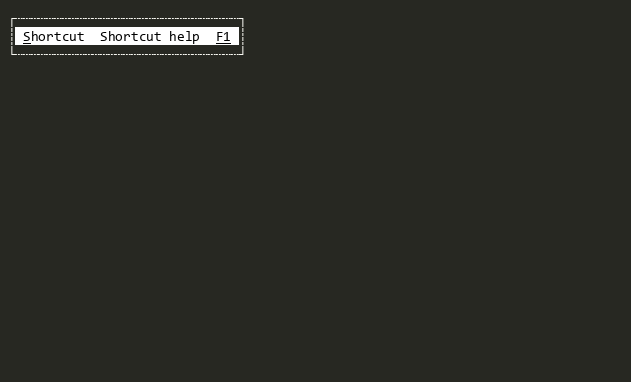
A Shortcut is a composite view containing three subviews: CommandView (command text and hotkey, left side by default), HelpView (help text, middle), and KeyView (key binding display, right side). From the user's perspective, a Shortcut acts as a single control—clicking anywhere on it produces the same result regardless of which subview was hit.
Commands: Shortcut participates in the standard Command system:
| Command | Trigger and behavior |
|---|---|
| Activate |
Triggered by Space, mouse click, or Key press. Changes state
(e.g., toggles a CheckBox) and invokes Action.
|
| Accept |
Triggered by Enter or double-click. When initiated from a key binding,
Accept is converted to Activate so it flows
through the menu/bridge architecture correctly.
|
| HotKey | Triggered by the HotKey letter in CommandView or by Key. Sets focus, then invokes Activate. |
Relay Dispatch: Shortcut uses relay dispatch
(GetDispatchTarget => CommandView, ConsumeDispatch = false).
Commands dispatched to CommandView complete normally (e.g., CheckBox
toggles), then Shortcut is notified via a deferred callback.
Sets CommandsToBubbleUp to
[Activate, Accept], enabling commands from
CommandView to bubble up to the Shortcut for centralized handling.
Replaceable CommandView: The CommandView can be replaced with any View (e.g., CheckBox, Button). The Shortcut automatically adapts its activation behavior to the CommandView.
Application-Wide Key: If BindKeyToApplication is true, Key will invoke HotKey (and thus Activate) regardless of what View has focus, enabling an application-wide keyboard shortcut.
Layout: By default, a Shortcut displays the command text on the left, help text in the middle, and key binding on the right. Set AlignmentModes to EndToStart to reverse the order. The command text can be set via Title or the CommandView's Text property. The help text can be set via HelpText or Text. The key text is set via Key; if Key is Empty, the key text is not displayed.
MouseHighlightStates defaults to In, causing the Shortcut to highlight when the mouse is over it.
See Shortcut Deep Dive for detailed information on command routing, the BubbleDown pattern, dispatch flows, and CommandView variant behaviors.
See Menus Deep Dive for how Shortcut fits into the menu system class hierarchy.
Constructors
- Shortcut()
Creates a new instance of Shortcut.
- Shortcut(Key, string?, Action?, string?)
Creates a new instance of Shortcut.
Properties
- Action
Gets or sets the action to be invoked when the Shortcut is Activated.
- AlignmentModes
Gets or sets the AlignmentModes for this Shortcut.
- BindKeyToApplication
Gets or sets whether Key is bound to Command via HotKeyBindings or KeyBindings.
- Command
Gets or sets the Command that will be invoked on TargetView when the Shortcut is accepted. If no TargetView is set, the Key will be used to invoke commands bound at the application level.
- CommandView
Gets or sets the View that displays the command text and hotkey.
- HelpText
Gets or sets the help text displayed in the middle of the Shortcut.
- HelpView
The subview that displays the help text for the command. Internal for unit testing.
- KeyView
Gets the subview that displays the key. Is drawn with Normal and HotNormal colors reversed.
- MinimumKeyTextSize
Gets or sets the minimum size of the key text. Useful for aligning the key text with other Shortcuts.
- Orientation
Gets or sets the Orientation for this Bar. The default is Horizontal.
- TargetView
Gets or sets the target View that the Command will be invoked on when the Shortcut is accepted.
- Text
Gets or sets the help text displayed in the middle of the Shortcut. Identical in function to HelpText .
Methods
- Dispose(bool)
Performs application-defined tasks associated with freeing, releasing, or resetting unmanaged resources.
- EnableForDesign()
Causes the View to enable design-time mode. This typically means that the view will load demo data and be configured to allow for design-time manipulation.
- EndInit()
Signals the View that initialization is ending. See ISupportInitialize.
- GetDemoKeyStrokes()
Returns a tuirec-format keystroke string for recording a demo GIF of this view. The string uses tuirec token syntax (e.g.
"wait:500,Enter,wait:800,Escape"). This is a new API added in v2 to support automated documentation generation.
- GetDispatchTarget(ICommandContext?)
Shortcut dispatches all commands to CommandView. The framework handles:
- Source guard (skip if source is already within CommandView)
- Programmatic guard (skip if no binding)
- OnActivated(ICommandContext?)
Called when the View has been activated. This is called after Accepting has been raised and not cancelled.
- OnGettingAttributeForRole(in VisualRole, ref Attribute)
Called when the Attribute for a GetAttributeForRole(VisualRole) is being retrieved. Implementations can return true to stop further processing and optionally set the Attribute in the event args to a different value.
- OnOrientationChanged(Orientation)
Called when Orientation has changed.
- OnSubViewLayout(LayoutEventArgs)
Called from Terminal.Gui.ViewBase.View.LayoutSubViews before any subviews have been laid out.
Events
- OrientationChanged
Raised when Orientation has changed.
- OrientationChanging
Raised when Orientation is changing. Can be cancelled.