Class Tabs
A tabbed container View that renders each SubView as a selectable tab with a header drawn by Border. The currently focused SubView is the selected (front-most) tab.
public class Tabs : View, IDisposable, ISupportInitializeNotification, ISupportInitialize, IValue<View?>, IValue, IDesignable- Inheritance
-
Tabs
- Implements
- Inherited Members
- Extension Methods
Remarks
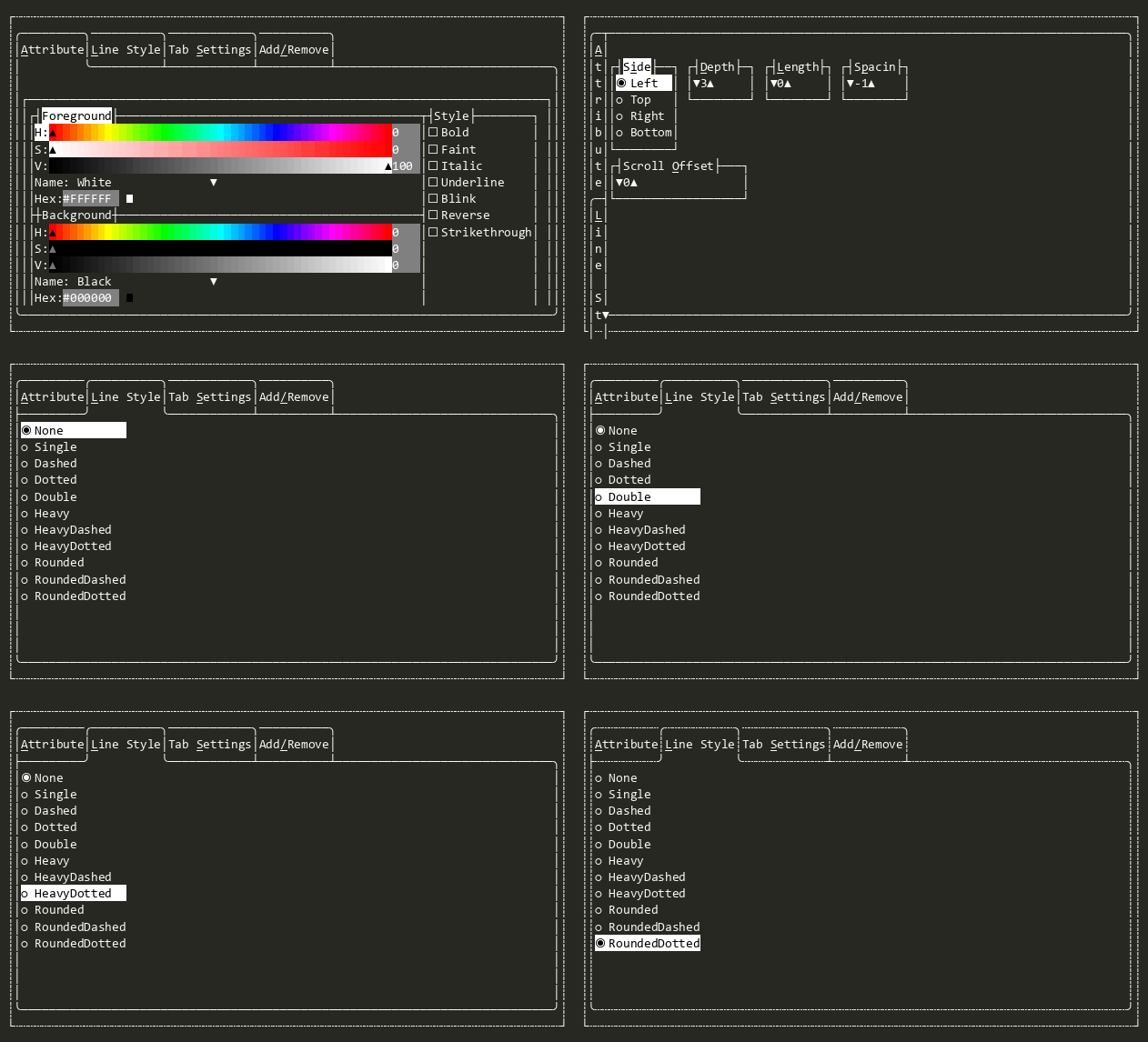
Add any View instances via Add(View?). Each added view is automatically configured with Tab, Overlapped arrangement, and a Thickness derived from TabDepth and TabSide.
The selected tab is determined by focus — whichever SubView has focus is drawn on top and reported as the Value. Set Value programmatically to switch tabs.
Logical tab order is maintained separately from the draw order (SubViews). Use TabCollection to enumerate tabs in logical order, and InsertTab(int, View) to add a tab at a specific position.
When tabs overflow the available space, scroll indicator buttons appear on the separator line of each tab's border. Use ScrollOffset to scroll programmatically.
In earlier versions of Terminal.Gui, `TabView` provided similar functionality.
Constructors
Properties
- ScrollOffset
Gets or sets the current scroll offset for the tab headers. Adjusting this value scrolls the tab headers along the TabSide edge.
- TabCollection
Gets the tabs in logical order. This may differ from SubViews order because the focused tab is moved to the end of the draw list to render on top.
- TabDepth
Gets or sets the depth of the tab header in rows (for Top/Bottom) or columns (for Left/Right). The default is 3, which provides room for the outside border, title text, and a 1-character separator line.
- TabLineStyle
Gets or sets the LineStyle used for tab borders. When set, updates the BorderStyle of all existing tab SubViews.
- TabSide
Gets or sets which side the tab headers are displayed on.
- TabSpacing
Gets or sets the spacing between adjacent tab headers. Negative values cause tabs to overlap (sharing border cells). The default is
-1, which shares one border edge between adjacent tabs. A value of0places tabs edge-to-edge. Positive values insert a gap between tabs.
- Value
Gets or sets the currently selected tab view. Setting this focuses the specified view, scrolls the tab headers to ensure it is visible, and updates the z-order so it draws on top.
Methods
- Dispose(bool)
Performs application-defined tasks associated with freeing, releasing, or resetting unmanaged resources.
- EnableForDesign()
Causes the View to enable design-time mode. This typically means that the view will load demo data and be configured to allow for design-time manipulation.
- GetDemoKeyStrokes()
Returns a tuirec-format keystroke string for recording a demo GIF of this view. The string uses tuirec token syntax (e.g.
"wait:500,Enter,wait:800,Escape"). This is a new API added in v2 to support automated documentation generation.
- GetSubViews(bool, bool, bool)
Reorders the SubViews to match the logical tab order defined by TabCollection. This ensures that navigation and other operations that rely on SubView order function according to the logical tab order, rather than the draw order which may differ due to focused tab being drawn last.
- IndexOf(View)
Gets the logical index of the specified view within this Tabs container.
- InsertTab(int, View)
Inserts a view as a tab at the specified logical index. The view is added as a SubView, configured with tab border settings (same as Add(View?)), and placed at
indexin the TabCollection order.
- OnAdvancingFocus(NavigationDirection, TabBehavior?)
Called when AdvanceFocus(NavigationDirection, TabBehavior?) is about to advance focus.
- OnFocusedChanged(View?, View?)
Called when the focused view has changed.
- OnSubViewAdded(View)
Configures a subview when it is added to the tab view, applying tab-specific layout, border, and focus settings.
- OnSubViewAdding(EventArgs<View>)
Handles adding the new tab View to an internal tracking list, and ensuring CanFocus is set to false so that focus will not change during the Add(View?) flow.
- OnSubViewLayout(LayoutEventArgs)
Called from Terminal.Gui.ViewBase.View.LayoutSubViews before any subviews have been laid out.
- OnSubViewRemoved(View)
Handles removal of a SubView by removing it from the logical tab list. If the removed view was the selected tab, the first remaining tab is selected.
- OnValueChanged(ValueChangedEventArgs<View?>)
Called when Value has changed.
- OnValueChanging(ValueChangingEventArgs<View?>)
Called when Value is changing. Override to cancel the change.
- OnViewportChanged(DrawEventArgs)
Called when the Viewport changes. Invokes the ViewportChanged event.
Events
- ValueChanged
Raised when Value has changed.
- ValueChangedUntyped
Raised when Value has changed, providing the value as an un-typed object.
- ValueChanging
Raised when Value is about to change. Set Handled to true to cancel the change.