Class Markdown
A read-only view that renders Markdown-formatted text with styled headings, lists, links, code blocks, and more.
public class Markdown : View, IDisposable, ISupportInitializeNotification, ISupportInitialize, IDesignable- Inheritance
-
Markdown
- Implements
- Inherited Members
- Extension Methods
Remarks
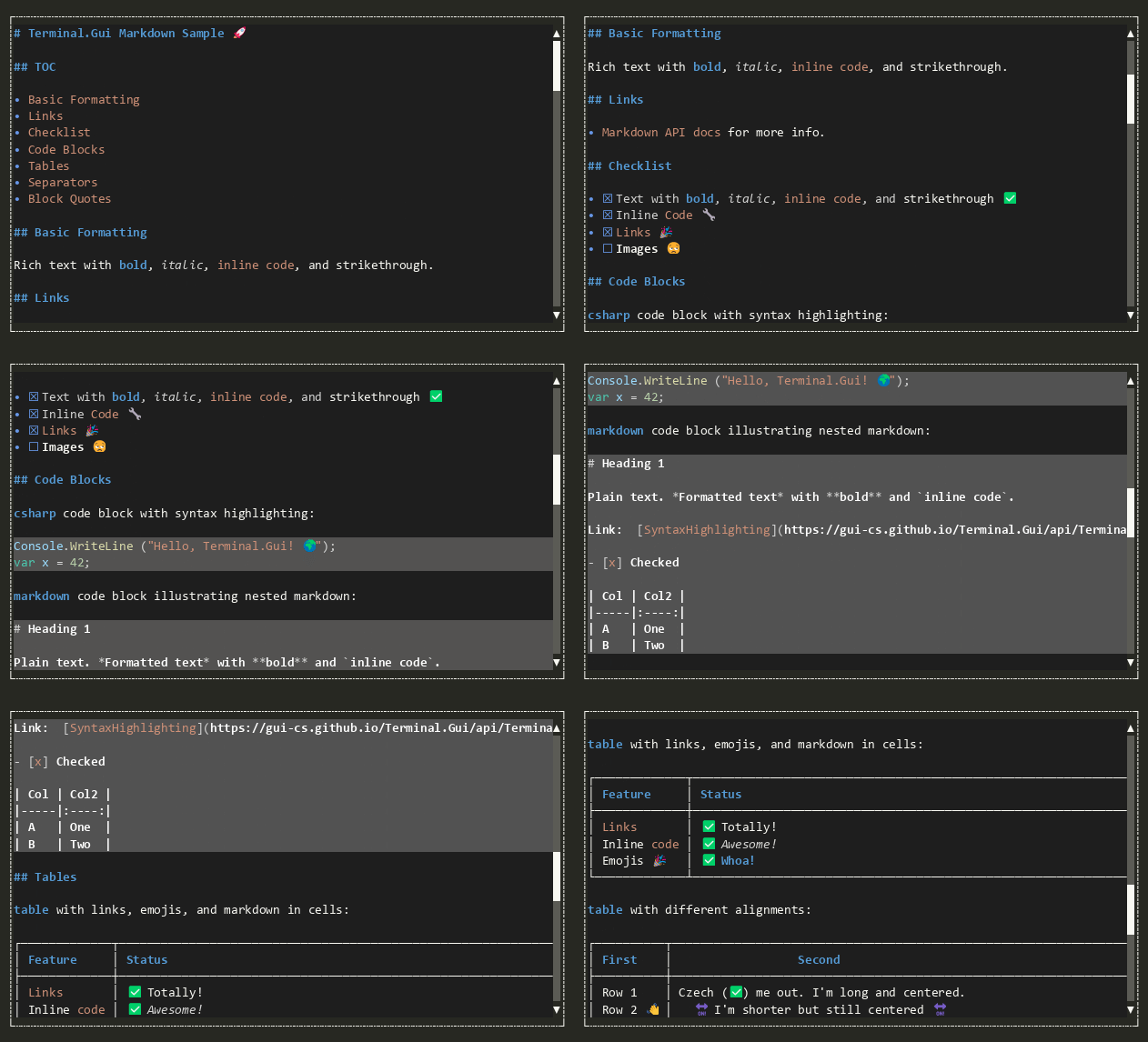
Set the Text property to supply content. The view parses the Markdown, performs word-wrap layout, and draws styled output. Fenced code blocks receive a full-width dimmed background; inline code, emphasis, strong, and other elements are rendered with appropriate text styles and colors.
Hyperlinks raise the LinkClicked event. Anchor links (URLs beginning with
#) are handled automatically by scrolling to the matching heading.
Default key bindings:
| Key | Action |
|---|---|
| Ctrl+A | Selects all rendered content (SelectAll). |
| Ctrl+C | Copies the current selection to the clipboard, or the entire markdown source if nothing is selected (Copy). |
| Shift+F10 / Right-click | Opens a context menu with Select All and Copy items. Right-clicking on a hyperlink also adds a Copy Link item that copies the URL to the clipboard. |
Default mouse bindings:
| Mouse Event | Action |
|---|---|
| Left-button drag | Selects text by dragging the mouse. |
| Left-button click | Clears the selection and activates a hyperlink if one is under the cursor. |
| Right-button click | Opens the context menu. |
Constructors
- Markdown()
Initializes a new instance of the Markdown class.
Properties
- ContextMenu
Gets the context menu for this view.
- DefaultMarkdownSample
Gets a short but comprehensive Markdown sample covering common features.
- EnableSixelImages
Gets or sets whether sixel image rendering is enabled.
- HotKeySpecifier
Gets or sets the specifier character for the hot key (e.g. '_'). Set to '\xffff' to disable automatic hot key setting support for this View instance. The default is '\xffff'.
- ImageLoader
Gets or sets an optional callback that loads image data as UTF-8 encoded sixel payloads.
- LineCount
Gets the total number of rendered lines after parsing and word-wrap layout.
- MarkdownPipeline
Gets or sets the Markdig Markdig.MarkdownPipeline used for parsing.
- SelectedText
Gets the text that corresponds to the current selection, rendered as plain text from the displayed content. Returns null when no selection is active.
- ShowCopyButtons
Gets or sets whether code blocks display a copy button in the top-right corner. Defaults to true.
- ShowHeadingPrefix
Gets or sets whether heading lines include the
#prefix (e.g.#,##). When true (default), the hash markers are displayed so that heading levels are visually distinguishable. When false, only the heading text is shown.
- SyntaxHighlighter
Gets or sets an optional syntax highlighter for fenced code blocks.
- Text
Gets or sets the Markdown-formatted text displayed by this view.
- UseThemeBackground
Gets or sets whether the view fills its background with the syntax highlighting theme's editor background color. When true and a SyntaxHighlighter is set, the theme's DefaultBackground is used for the entire viewport, headings, body text, and table cells. Defaults to true.
Methods
- ClearSelection()
Clears the current selection.
- Copy()
Copies the current selection, or the entire markdown document if nothing is selected, to the clipboard.
- Dispose(bool)
Performs application-defined tasks associated with freeing, releasing, or resetting unmanaged resources.
- OnActivated(ICommandContext?)
Called when the View has been activated. This is called after Accepting has been raised and not cancelled.
- OnActivating(CommandEventArgs)
Called when the user has performed an action (e.g. Activate) causing the View to change state or preparing it for interaction. Set CommandEventArgs.Handled to true and return true to indicate the event was handled and processing should stop.
- OnAdvancingFocus(NavigationDirection, TabBehavior?)
Called when AdvanceFocus(NavigationDirection, TabBehavior?) is about to advance focus.
- OnContentSizeChanged(ValueChangedEventArgs<Size?>)
Called after the content size has changed.
- OnDrawingContent(DrawContext?)
Called when the View's content is to be drawn. The default implementation does nothing.
- OnDrawingSubViews(DrawContext?)
Called when the SubViews are to be drawn.
- OnHasFocusChanged(bool, View?, View?)
Invoked after HasFocus has changed. This method is called before the HasFocusChanged event is raised.
- OnLinkClicked(MarkdownLinkEventArgs)
Called when a hyperlink is clicked, before the LinkClicked event is raised.
- OnMarkdownChanged()
Called after the Text property changes, before MarkdownChanged is raised.
- OnMouseEvent(Mouse)
Called when a mouse event occurs within the view's Viewport.
- OnSubViewLayout(LayoutEventArgs)
Called from Terminal.Gui.ViewBase.View.LayoutSubViews before any subviews have been laid out.
- RenderToAnsi(string?, int)
Renders the current Text (or the supplied
markdown) to an ANSI escape-sequence string suitable for writing directly to a terminal.
- ScrollToAnchor(string)
Scrolls the viewport so that the heading matching the given anchor slug is visible at the top.
- SelectAll()
Selects all rendered content.
Events
- LinkClicked
Raised when a hyperlink is clicked. Set Handled to prevent default navigation.
- MarkdownChanged
Raised after the Text property changes and the content has been reparsed.